A custom print-business platform, restaurant ordering, voice simulation, and product collaboration. Each case explains the role, the product experience, and the evidence available. Original product imagery and workflow diagrams are identified separately.
Printing industry · custom software
One platform for the print business, from order to production and finance
The core platform and print-specific modules have distinct validation stages.
Timefields custom-developed an end-to-end business and production management platform for a printing enterprise. It integrates customer relationship management (CRM), enterprise resource planning (ERP), and manufacturing execution (MES), covering customers and orders, purchasing, resources, production and finance.
CRM · ERP · MESIllustrative module map
Connect the order, resources, production and financial record
01
Customers & orders
Keep the customer, quotation and order requirements connected.
CRM
02
Purchasing & resources
Bring procurement, materials and resource information into the job scope.
ERP
03
Production execution
Follow jobs, machines and planned or completed quantities.
MES
04
Financial management
Connect business activity with invoice, payment and supplier-bill records.
ERP
Illustrated module map. Not a live ERP/MES screen or a claim that every current integration is production-accepted.
What the work covers
The business scope spans customer and sales records, quotations and orders, procurement, material and resource management, production execution, and financial records such as invoices, payments and supplier bills. Print-specific work extends the platform through PrepressPortal, ink-key control and color-registration development.
What this makes visible
The platform brings the business record and production job into the same end-to-end development scope. The diagram explains module relationships; it is not a live ERP/MES screen or measured efficiency result.
Approved files, output preparation, ink setup and color alignment belong to the same industry solution. Each module below has its own development and acceptance boundary.
PrepressPortal
Workflow implementation · output validation
An approved file needs a traceable path into the required print output.
Input
Publication requirements, PDFs, versions, review comments and approval records.
Output / objective
Preparation and output paths: Refine, Impose, Screened contone, RIP, Plate, and PPF / Inkzone.
Module connection
Carries the reviewed job context toward production and ink-preset preparation.
Output branches are developed and checked separately. Full historical plate-output parity is not established.
Ink-key preset and control
In development · physical validation pending
Ink setup needs usable zone information rather than a disconnected file handoff.
Input
PPF job information and ink-zone coverage.
Output / objective
Ink-key preset values and a control-interface handoff.
Module connection
Links prepress job information to the press-control work within the production scope.
Physical press acceptance remains pending. Compatibility and operating behavior need verification for the selected equipment.
Color-registration system
In development · objective described
Printed color separations need to align during production.
Input
Measurement inputs and their acquisition path are not yet presented in this case.
Output / objective
The development objective is to support checking and correcting color alignment.
Module connection
Extends the print-production and quality-control scope; the detailed integration is not asserted here.
This case does not claim a particular algorithm, correction mechanism, accuracy or production performance.
Diagram of the development scope, not a product screen. Output paths are validated individually; full historical plate parity is not established. PPF and zone coverage feed ink-preset and control-interface development.
Restaurant technology
FanDine — restaurant ordering on mobile
Founder-owned product · app development
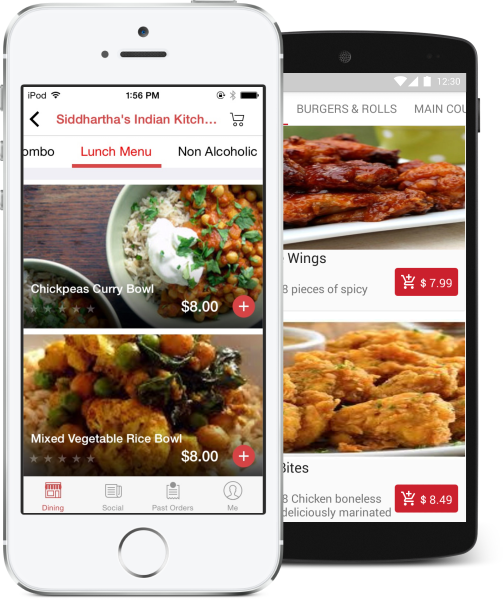
Timefields developed FanDine’s food-ordering app. FanDine is a product owned by Albert, who is also the founder and owner of Timefields.
FanDineOriginal product imagery
Product interface shown on the FanDine website.
Our role
Mobile app development for a restaurant-ordering product connecting diners and restaurants.
The product experience
FanDine’s official website describes a dining journey from table QR check-in to menu browsing, ordering, and in-app payment. Its product imagery shows restaurant menus, dining records, and bill details.
This is the publicly described product experience; the Timefields role confirmed for this case is app development.
Case evidence
The app-development case is a founder-owned product. Its official product materials supply the original interface imagery shown here.
Historical product context
This case describes prior app-development work. Current app availability and service operation have not been established; no download or active-user claim is made.
Stage described in the 1 October 2026 scope summary.
A product interaction needs a way to test how a spoken request becomes a defined action, an acknowledgement, and a visible device response before wider hardware integration.
Voice simulationIllustration · synthetic data
Make the command and its result visible
01
Receive a command
“Set the light to warm.”
Synthetic command
02
Check authorization
Confirm whether the action is permitted.
Allow or reject
03
Inspect the response
A permitted action updates the simulated state.
Virtual device
Rejected pathAuthorization missing → action rejected → simulated state unchanged.
Illustrated simulator sequence · synthetic data. Not an operating voice demo or a physical-device test.
What the work covers
Development includes a simulator, command and acknowledgement paths, authorization checks, and failure scenarios. Hardware and firmware responsibilities remain separate from the software simulation scope.
What this makes visible
The historical test setup made command handling and virtual-device responses observable. The diagram is illustrative; no current product demonstration is embedded.
Stage described in the 1 October 2026 scope summary.
Project conversations can lose the issue, decision, or supporting information that prompted them. A shared issue entry point can keep that context close to the next discussion.
Product collaborationIllustration · synthetic data
Keep the issue close to the conversation
01
Open the issue
Review the background and the next question.
Synthetic issue
02
Choose an email tool
Carry the issue context into the next discussion.
Context handoff
03
Review the draft
Edit the proposed message before choosing to send.
Unsent draft
Illustrated workflow · synthetic data. No real customer issue, mailbox or sent message is shown.
What the work covers
An existing collaboration example organizes product issues and their background, supporting a continuation through familiar email tools.
What this makes visible
The documented scope provides a shared issue entry point and context for email discussion. The diagram uses synthetic content and sends nothing.